

Make a bill and collect payment
Bill a visit, apply discounts and HMO or PhilHealth cover, and take the patient’s share.
Start the bill
Finished visits go to billing with their items. For anything else click New bill on Billing, or New bill on the patient’s page.
Add items
Click Add item and search your price list for services, lab tests and medicines.
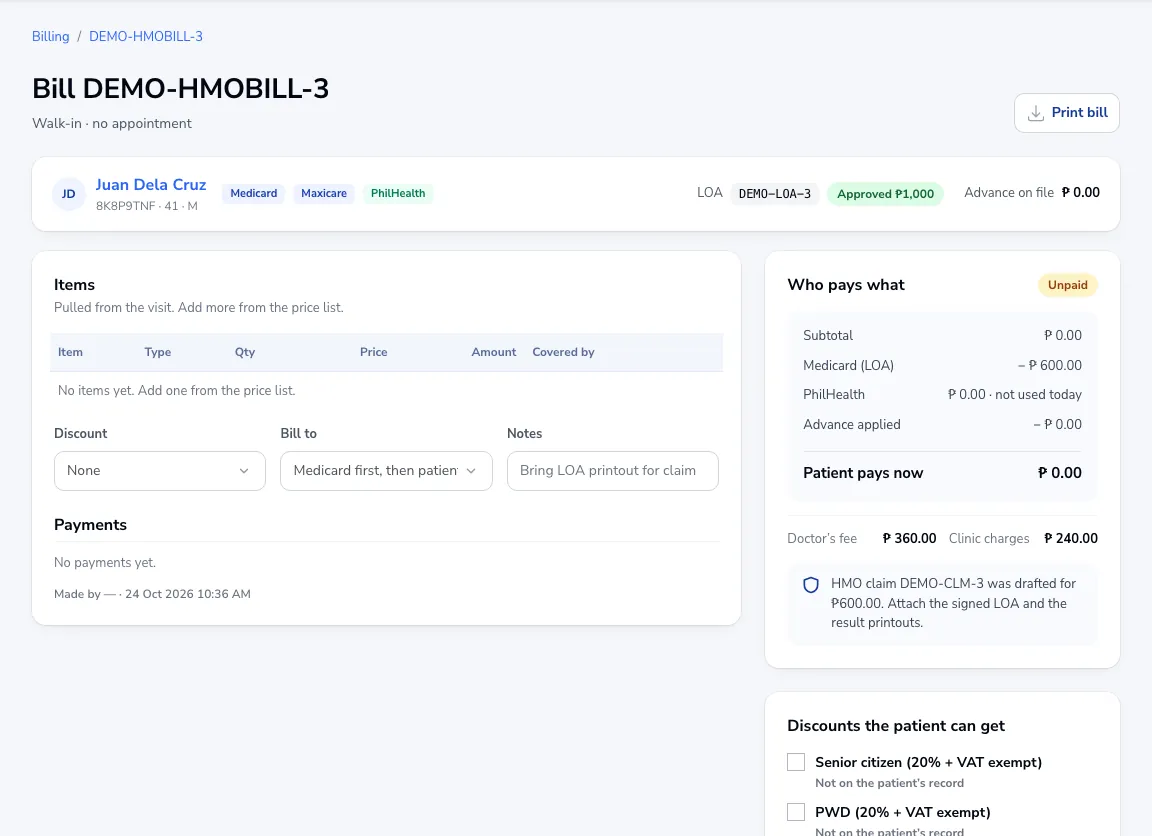
Discounts and who pays
Choose a discount (senior citizen and PWD are 20% off and VAT-exempt; senior needs the OSCA ID on the patient’s record). Under Bill to choose the patient only or the HMO first, then the patient. Who pays what shows the HMO’s share, PhilHealth, any advance payment, and what the patient pays now.
Collect
Save the bill and record the payment: cash, GCash, Maya, card, cheque or a split. An official receipt is issued from your OR series.
Tip When a bill is charged to an HMO, a claim is drafted for you. Attach the signed LOA and results to it.
Was this article helpful?